
Set a known ZTF field
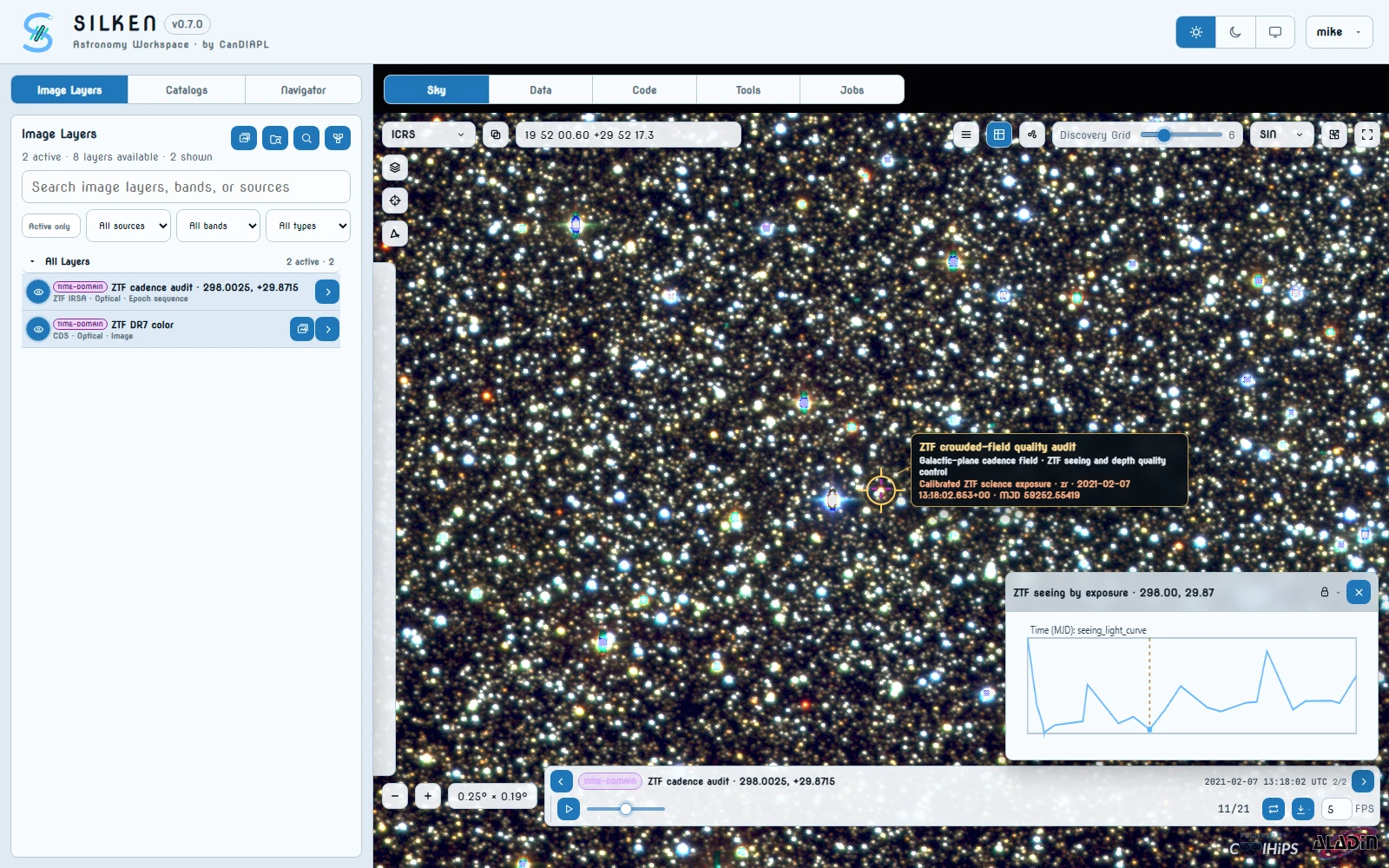
In Sky, enter 298.0025 +29.87147 in the position box and use a field of view of about 0.25 deg.
The importer can infer a useful position from loaded temporal catalog rows, an active epoch sequence, the current position’s ZTF coverage, or a verified fallback. Entering this coordinate makes the demo deterministic.
Add a static reference image
Open Image Layers, search for ZTF DR7 color, and click its layer card. The layer should become visible immediately at 100% opacity.
Import the epoch sequence
Click Import epoch image sequence in the Image Layers toolbar, or use the frames icon on a ZTF layer. Confirm the dialog contains approximately:
Select a ZTF archive. SILKEN immediately discovers the available filters and time range and shows the complete chronological exposure list. The default Total count mode selects up to 24 evenly spaced frames. You can instead choose All, Every N, or Choose and click individual frame cards.
Confirm the visual selection, then click Import N frames. A bounded decoded window stays in Aladin while normalized FITS bytes are cached in the contributed CANFAR runtime.
Play the sequence
In Image Layers, use the target icon on the new epoch sequence if you need to return to its cutout. Wait until the Frame play button becomes enabled, then:
- Drag the Frame slider and confirm that the FITS image changes.
- Watch Observation Time update beside the slider.
- Press Play to animate the buffered sequence.
- Change the integer FPS value or toggle looping.
The import also creates a ZTF ... exposure metadata query under Catalogs > Alerts and a Data tab. Its seeing or maglimit scalar overlay changes with the selected image frame.
The static ZTF HiPS remains as context while the smaller epoch cutout advances through real archive exposures. Timestamp, seeing, and limiting magnitude advance with the Frame control, providing a reproducible cadence and image-quality audit before transient measurements are interpreted.
Set the field
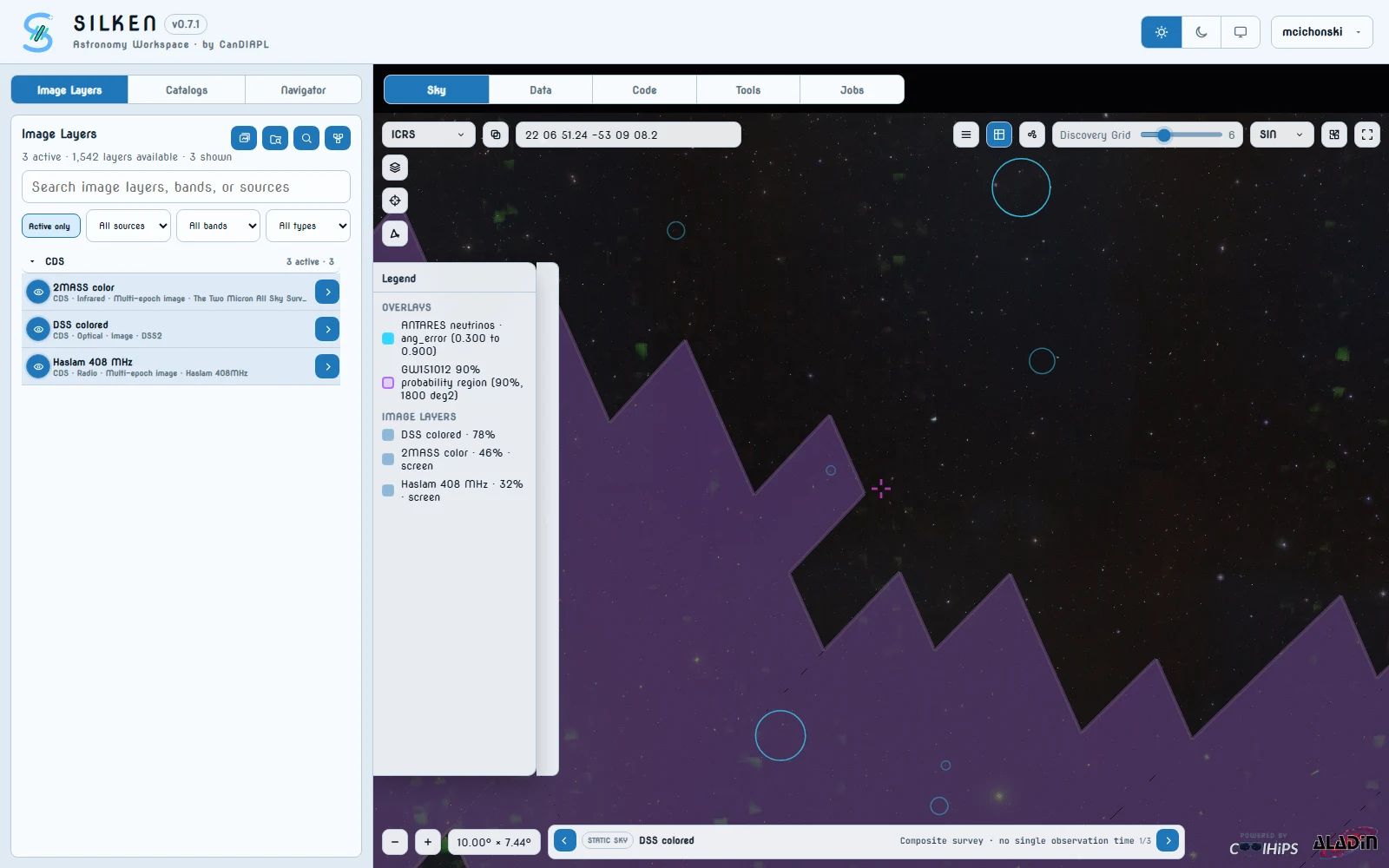
In Sky, enter 331.5 -52.0 and use a field of view of about 10 deg.
Blend three image bands
Open Image Layers and keep the default DSS colored layer active for optical, then activate 2MASS color for infrared and Haslam 408 MHz for radio. All three layers should appear in the Aladin stack and the Image Layers legend. Use a normal optical base and progressively lighter screen blends for infrared and radio so stellar detail and diffuse emission remain visible together.
Add a gravitational-wave probability footprint
Open Catalogs > GW Skymaps, select GWOSC GWTC events, enter GW151012, and run the search. SILKEN downloads the published HEALPix FITS sky map, derives its 90% credible region, and adds it as a purple footprint. The corresponding result also appears as a Data tab.
GW151012 is used because its broad localization crosses this POSSUM pilot field. The generated 90% region covered about 1,800 square degrees during validation.
Add ANTARES neutrino events
Open Catalogs > VO Tables, select ANTARES neutrinos, and run:
SELECT TOP 100
  id,
  raj2000,
  dej2000,
  ang_error,
  epoch_mjd,
  n_hits
FROM antares.data
WHERE raj2000 BETWEEN 327.5 AND 335.5
  AND dej2000 BETWEEN -55.5 AND -48.5
In that query’s Overlay section, show ang_error as a scalar overlay. The circles mark ANTARES event positions and encode their angular uncertainties.
Add public POSSUM polarization measurements
Open Catalogs > Youcat, select cirada.POSSUM_prototype, and run:
SELECT TOP 100
  id_number_sourcefinder,
  ra,
  dec,
  total_flux_sourcefinder,
  stokesI,
  stokesQ,
  stokesU,
  rm,
  rm_err,
  fracpol
FROM cirada.POSSUM_prototype
WHERE ra BETWEEN 327.5 AND 335.5
  AND dec BETWEEN -55.5 AND -48.5
ORDER BY total_flux_sourcefinder DESC
Map total_flux_sourcefinder, rm, or fracpol to marker size or colour. This public table is sufficient for source selection and RM triage. The richer pilot spectra and FDF tables can require CIRADA project access, so they are optional enrichment rather than a hidden prerequisite.
The Sky view contains optical, infrared, and radio imagery, the purple GW151012 region, ANTARES uncertainty circles, and public POSSUM polarization measurements. The Data view keeps a separate tab for every query. This is localization triage: overlap ranks follow-up candidates but does not establish association.
Set the shared field
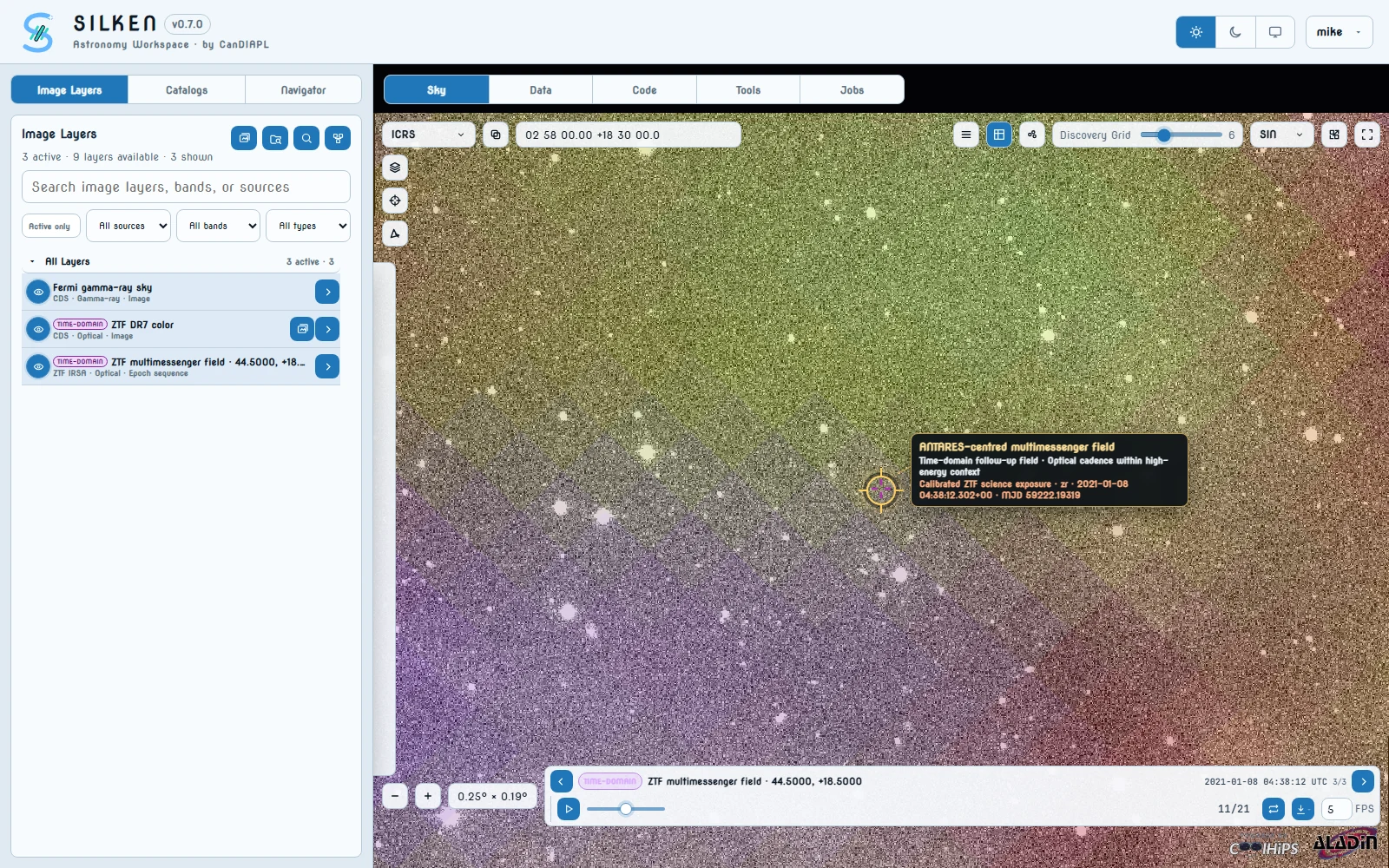
In Sky, enter 44.5 +18.5 and start with a field of view of about 8 deg.
Add electromagnetic context in two bands
Under Image Layers, activate ZTF DR7 color for optical context and Fermi gamma-ray color for gamma-ray context. Reduce the upper layer’s opacity or choose a different blend mode until both are readable.
Add the GW151012 footprint
Under Catalogs > GW Skymaps, select GWOSC GWTC events, enter GW151012, and run the search. Its purple 90% region includes the demo coordinate.
Add the ANTARES event at the center
Under Catalogs > VO Tables, select ANTARES neutrinos, and run:
SELECT TOP 10
  id,
  raj2000,
  dej2000,
  ang_error,
  n_hits
FROM antares.data
WHERE raj2000 BETWEEN 44.4 AND 44.6
  AND dej2000 BETWEEN 18.4 AND 18.6
Show ang_error as a scalar overlay. The live table returned one event at 44.5, +18.5, with an angular error of about 0.2 deg, during validation. The query deliberately omits epoch_mjd so this contextual neutrino circle remains visible throughout ZTF playback.
Import ZTF epoch images at the same position
Return to Image Layers and open Import epoch image sequence. Choose a ZTF archive; when opening from a ZTF layer's frames icon that archive is already selected. The dialog uses the current Aladin position (44.5, +18.5) and immediately loads its chronological frame list. Keep the default 24-frame Total count selection—or choose another pattern—and click Import N frames.
The live ZTF archive reported roughly 1,400 matching exposures during validation. Use the MJD range slider, band, and seeing filters to narrow that visible list. All, Every N, and Choose can import a different exact subset. A small playback window is buffered in Aladin while the contributed CANFAR runtime uses session RAM to cache normalized FITS bytes; a linked exposure-metadata query is created under Catalogs > Alerts.
Compare sky scales and play time forward
At 8 deg, inspect the GW footprint and ANTARES event in their broader context. Then use the target icon on the ZTF epoch sequence to inspect the smaller changing cutout.
Once the initial playback window is ready:
- Enable
seeingormaglimitfrom the ZTF metadata Overlay tab if it is not already visible. - Drag the Frame slider to compare individual exposures.
- Press Play and watch the FITS image, ZTF scalar overlay, and Observation Time update together.
- Zoom back out to recover the wider GW and neutrino context at any time.
At wide field, the viewer combines optical and gamma-ray image layers with a GW probability footprint and a neutrino uncertainty circle. At the epoch cutout scale, the Frame controls animate real ZTF images and their associated catalog metadata while the non-photon context remains registered in the same session.
Set the transient field
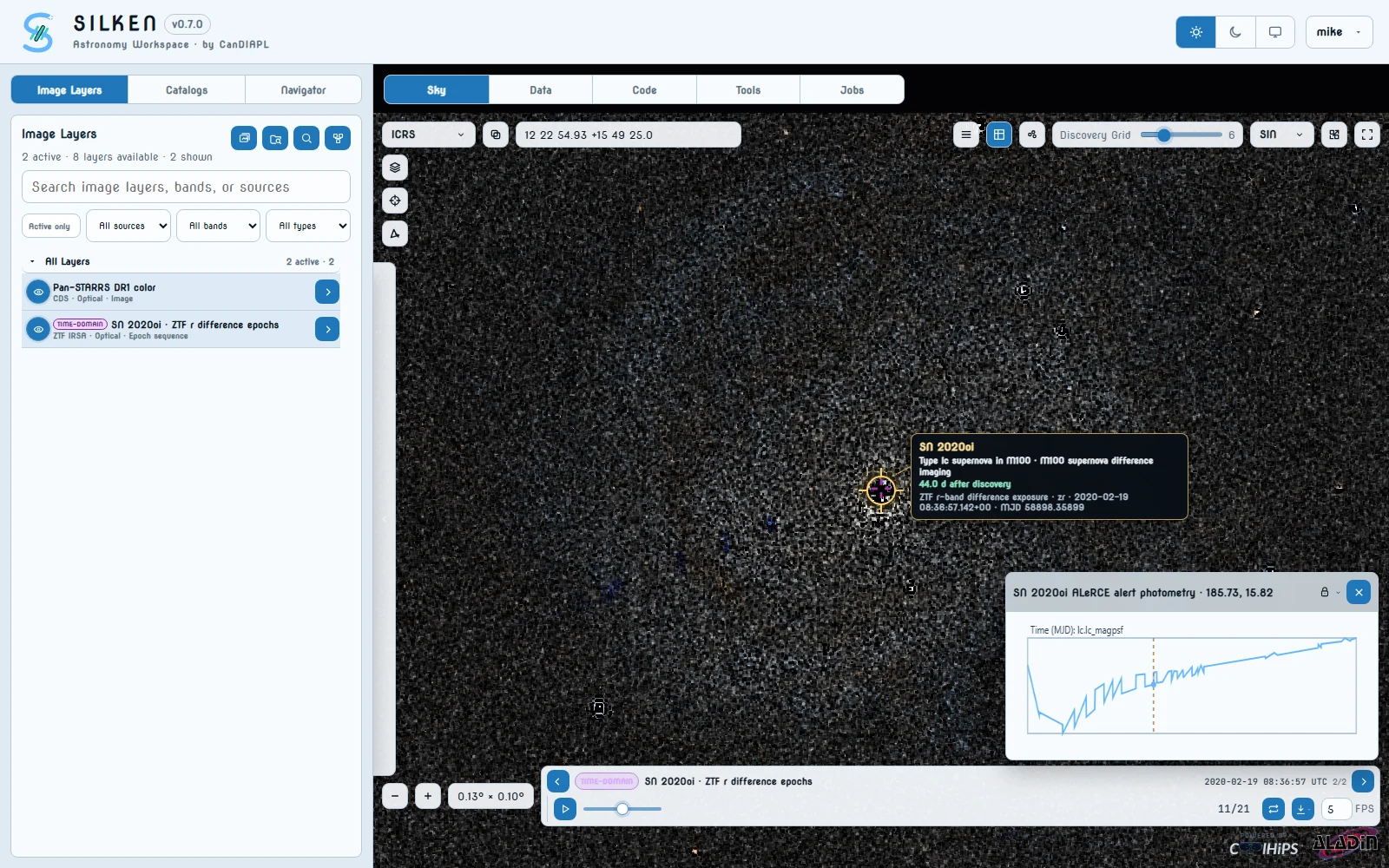
In Sky, enter 185.728862 +15.823611 and use a field of view near 0.16 deg. This is the ALeRCE mean position for ZTF20aaelulu, about five arcseconds north of M100's bright nucleus.
Add optical and infrared context
Under Image Layers, activate Pan-STARRS DR1 color for a deep optical view of M100 and AllWISE color for infrared host-galaxy context. Use opacity, hue, and blend controls to compare them without changing the view.
Load the public alert object
Open Catalogs > HATS and select ALeRCE Alerts. SILKEN selects the responsive Demo #4 projection by default: oid, mean_ra, mean_dec, lc.lc_mjd, and lc.lc_magpsf. Keep those five columns selected, set the row limit to 10, enter the advanced row filter oid == "ZTF20aaelulu", and run the query. Avoid All columns here because it downloads every nested alert field from a large remote sky partition.
The result is one alert object whose nested lc fields contain the public light curve. During validation it held 58 detections; the r-band measurements rose from about 17.28 mag at MJD 58855.542 to about 13.86 mag near MJD 58867.482, then declined.
Plot and lock the light curve
In the ALeRCE query's Overlay section, add lc.lc_magpsf as a profile. SILKEN pairs it with lc.lc_mjd and labels the horizontal axis Time (MJD). Hover the transient's outline marker, then lock the profile panel.
The selected-frame MJD moves an amber time cursor and a filled nearest-sample marker; updates are coalesced through the browser animation clock during playback. Optionally query HATS > TNS Transients with name == "2020oi" for fixed classification and discovery context.
Import one consistent ZTF sequence
Return to Image Layers, find a ZTF time-domain layer, and use its frames icon. Its difference-exposure archive is selected automatically and the frame list starts loading at the current RA and Dec. Set Band to r, Maximum seeing to 2.5 arcsec, and move the two MJD handles to approximately 58859 and 58910.
Keep Total count at 24. SILKEN samples the complete filtered interval evenly, including both endpoints, so the sequence captures the visible rise and the following decline without tedious individual-card selection. Click Import 24 frames; the first playback window is checked before the dialog closes, and later frames stream through the contributed-runtime cache as playback advances.
Follow the explosion through time
After the initial playback window is ready, step through the Frame slider with the profile visible or press Play. Compare the rapid rise toward the January maximum with the following weeks of decline. Observation Time and linked exposure metadata advance while both static backdrops stay fixed; playback waits for a requested server-backed frame rather than skipping it.
Keep the image stretch fixed across frames. SILKEN's amber target reticle identifies SN 2020oi at the centre of the cutout, labels it as a Type Ic stellar supernova about five arcseconds north of M100's nucleus, and identifies whether the selected sequence contains difference or science exposures. ZTF does not resolve an expanding fireball: the event is the stationary, star-like residual inside the reticle. In difference exposures the static light from M100 is subtracted; a science exposure instead retains the bright host nucleus and shows an orange warning in the callout. Use the live light curve, rather than an inferred per-frame label, to determine the measured rise and decline.
SN 2020oi remains at a stable position within M100 over optical and infrared context. The evenly sampled ZTF r-band difference exposures, timestamps, and metadata follow the Frame control, while the locked ALeRCE magnitude profile shows the measured rise and decline with an active-time cursor.
Set the blazar field
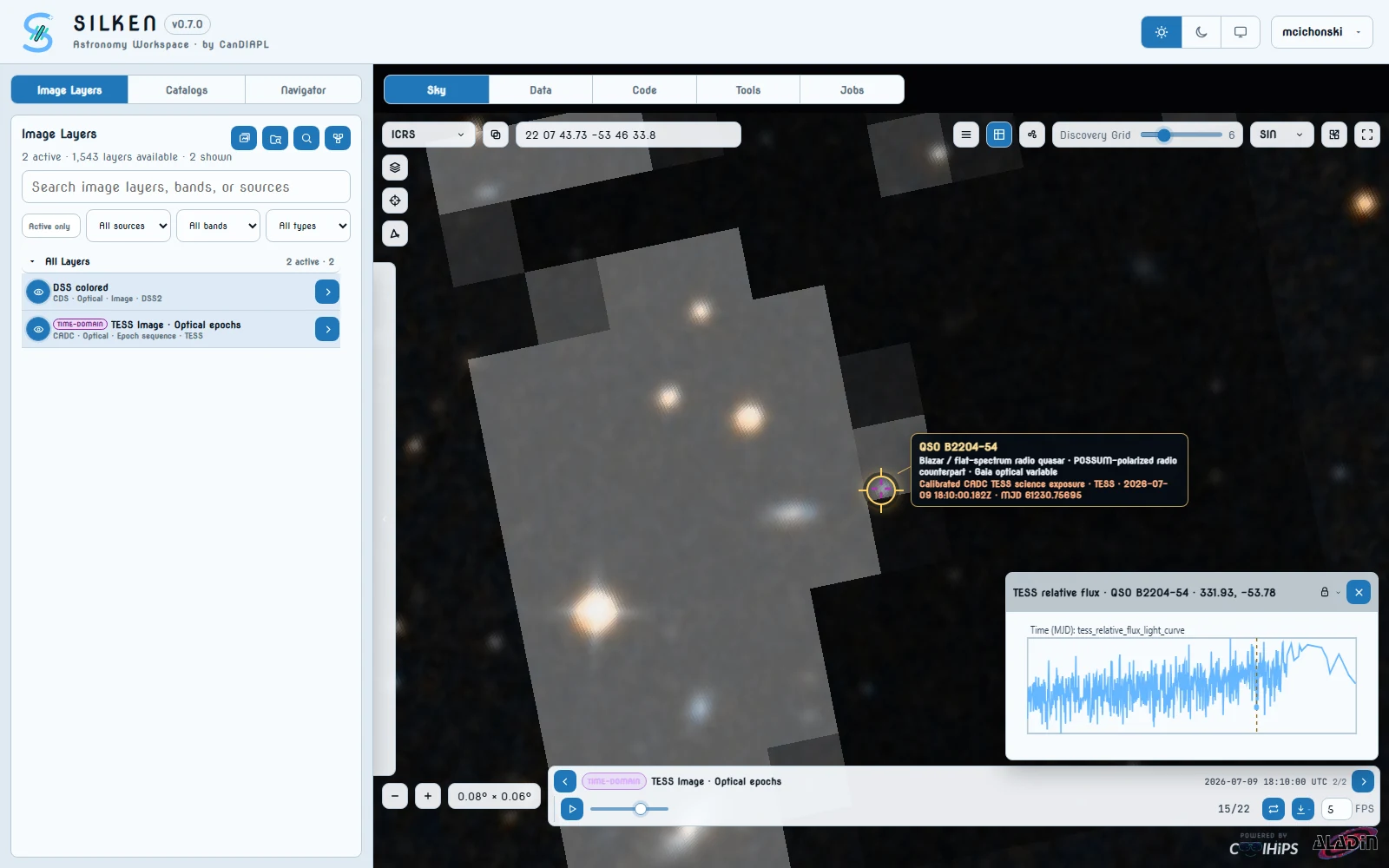
In Sky, enter 331.932222 -53.776061 and use a field of view near 0.08 deg. This tight view makes the compact optical counterpart and the changing TESS footprint easier to compare.
Add optical image context
Under Image Layers, keep the default DSS colored layer active. It is now the same managed layer shown in Aladin's native stack, so its visibility and opacity can be controlled from the left sidebar without adding a duplicate. Set it to 90% opacity; after importing the TESS sequence, set that layer to 25% opacity with the lighten blend mode. This preserves the sharper DSS stars while keeping the changing, lower-resolution TESS footprint visible. For sharper southern-sky context, SkyMapper DR4 color remains an alternative.
Query the public POSSUM prototype catalog
Open Catalogs > Youcat, select cirada.POSSUM_prototype, and run:
SELECT TOP 100
  id_number_sourcefinder,
  ra,
  dec,
  total_flux_sourcefinder,
  stokesI,
  stokesQ,
  stokesU,
  rm,
  rm_err,
  fracpol
FROM cirada.POSSUM_prototype
WHERE ra BETWEEN 331.92 AND 331.94
  AND dec BETWEEN -53.79 AND -53.76
ORDER BY total_flux_sourcefinder DESC
SB10040_component_2a is the centered counterpart. Validation returned about 1.60 Jy total source-finder flux and an RM near 15 rad m-2. Use rm or fracpol as a scalar overlay.
Preview its CADC radio cube
Open Catalogs > CADC Archive, keep Current view, set Collection to POSSUM, Product type to cube, Band to Radio, and the limit to 100. Run the search.
Resolve a raw_i or raw_qu Plane from a 943 MHz or 1368 MHz pilot observation and choose Preview. SILKEN uses DataLink and a bounded SODA cutout, so the Plane becomes an Image Layer without downloading the full cube. Use Import Full Product only when the complete spectral cube is required.
Load the Gaia counterpart metadata
Under Catalogs > HATS, select Gaia DR3. Choose source_id, ra, dec, phot_g_mean_mag, phot_bp_mean_mag, phot_rp_mean_mag, phot_variable_flag, in_qso_candidates, classprob_dsc_combmod_quasar, and has_epoch_photometry, then use the magnifying-glass action to query the current view.
Validation returned Gaia source 6509290397587697920. Its Gaia DR3 Epoch Photometry table contains 54 historical optical transits and remains useful as a separate long-baseline profile, but those measurements predate the 2026 TESS sequence. The synchronized video therefore uses contemporaneous TESS photometry in Step 7 rather than drawing a misleading cursor on the Gaia curve.
Import CADC TESS image epochs at the same position
Return to Image Layers, search for TESS Image · Optical, and use its frames icon. The CADC archive and current coordinates are selected automatically. Wait for the chronological frame list, keep Total count at 24, and import the calibrated sequence. SILKEN removes raw/calibrated duplicates for the same exposure, prefers the calibrated Plane, and derives each bounded cutout from the artifact's FITS WCS rather than unreliable archive scale metadata.
Set the imported sequence to 25% opacity with lighten blending over the 90% DSS layer. These are real TESS optical image epochs of the same variable blazar field. The validated poster frame was selected using a target-centred aperture compared with a local annulus, rather than by counting unrelated changes across the full image.
Query the time-aligned TESS light curve
Open Catalogs > VO Tables, choose TESSCut target aperture photometry, set the result limit to 5000, and run 331.932222 -53.776061 sector=105 mjd=61226.7/61232.6 aperture=3. SILKEN queries the public MAST target-pixel cube, rejects flagged cadences, and performs a local border-median background subtraction inside a three-pixel aperture.
Add tess_relative_flux_light_curve as a locked profile and place it at bottom-right for video export. Its MJD samples overlap every imported CADC TESS exposure, so the amber cursor marks the exact image time while the pixels change. Put the ISO date-time at top-left and omit the legend. For a resolved, dramatic transient structure, continue to Demo 6.
One restorable workspace contains a public POSSUM radio catalog row, a bounded CADC radio-cube preview, DSS2 optical context, Gaia counterpart metadata, a CADC TESS image sequence, and a contemporaneous MAST TESSCut light curve at the same celestial position. Restricted POSSUM spectra and FDF tables are optional enrichment, never a prerequisite.
Set the eruption field
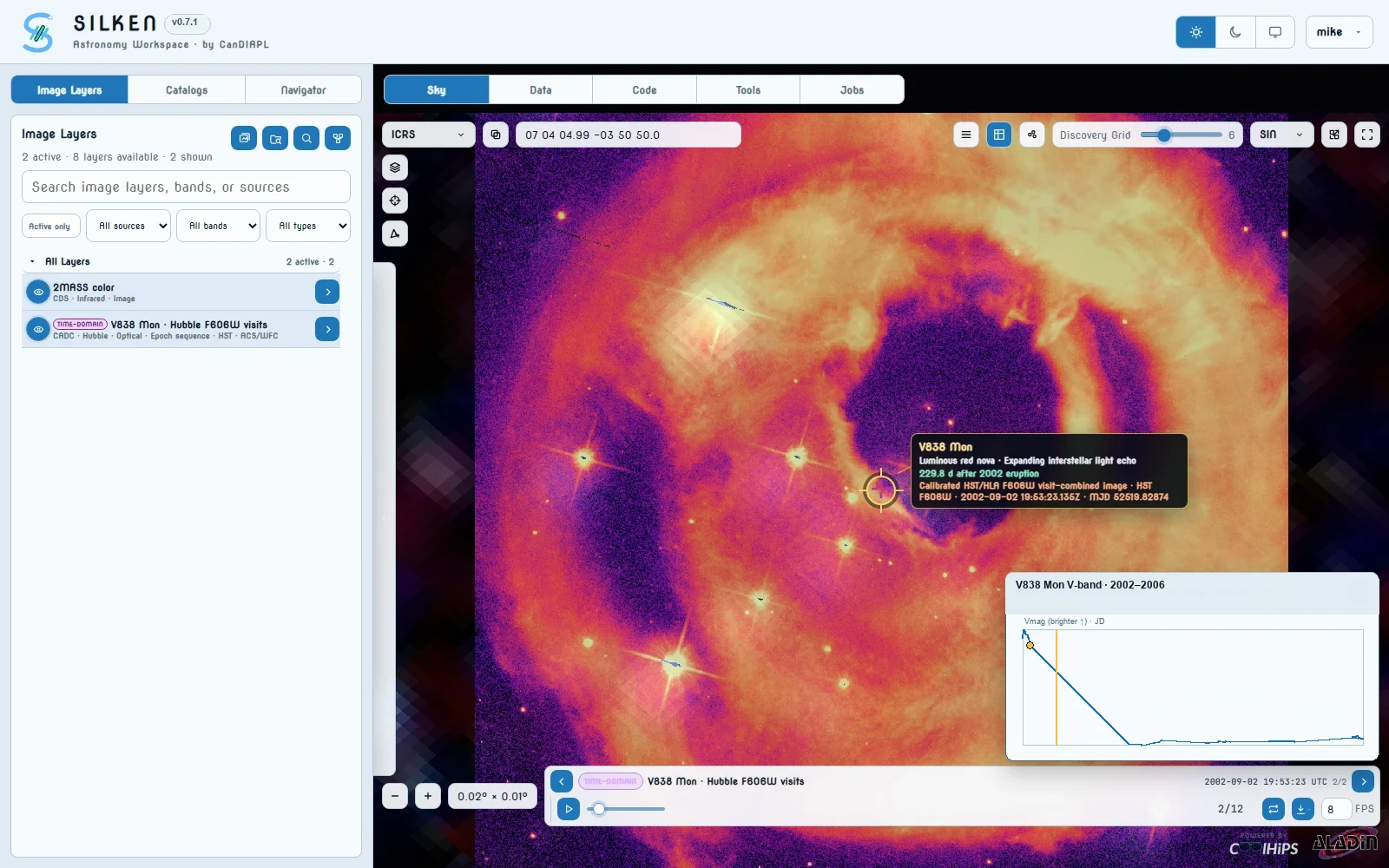
In Sky, enter 106.02079 -3.84722 and use a field of view near 0.02 deg. This fills the viewer with the resolved echo while preserving its immediate environment.
Add infrared context
Under Image Layers, activate 2MASS color and set it to 65% opacity, 155% saturation, and normal blending. The compact saturation slider uses 100% as neutral. This richer setting retains near-infrared field structure beneath the Hubble cutouts without overwhelming their fine detail.
Discover the clean Hubble visits
Search Image Layers for HST Image · Optical and use its frames icon. Keep the current position, choose Collection HST, select band F606W, and use the full available MJD range from approximately 52414.9 to 53987.9. Choose Total count and set it to 12.
SILKEN queries both native HST and Hubble Legacy Archive reductions, groups duplicate products from the same observing date, prefers clean visit-combined drizzle mosaics, and excludes static skycells, cross-filter aggregates, and individual products with avoidable detector gaps.
Blend and colour the resolved sequence
Import the twelve frames, then set the HST sequence to 78% opacity and 135% saturation over the 65% 2MASS layer using normal blending. In the Aladin stack, choose the vivid magma colour map and keep the colour map unreversed. The compact saturation slider treats 100% as neutral and updates the selected layer in place. This deliberately false-colour styling separates the echo from the near-infrared context; it changes presentation only, not archived pixel values.
Add the published long-baseline light curve
In Catalogs > Custom, import the public VizieR ASU-TSV URL https://vizier.cds.unistra.fr/viz-bin/asu-tsv?-source=J%2FA%2BA%2F670%2FA13%2Ftable2&-out=JD,Vmag&JD=2452300..2454200&-out.max=unlimited. Plot Vmag against JD, lock the profile to V838 Mon, and place it in a free video-export slot. This published 2002–2006 photometry overlaps the Hubble visits, so SILKEN can draw the amber observation-time cursor at the exact date of every frame rather than showing an unrelated early-eruption curve.
Validate the change where the transient actually is
Use the frame timeline to compare the earliest and latest visits. The documented sequence was screened with SILKEN's target-centred region-of-interest scorer: it normalizes each frame from a local control ring, smooths detector-scale noise, and measures coherent temporal change inside the target aperture. It does not select a sequence merely because many unrelated pixels changed elsewhere in the image.
There is no pre-outburst Hubble exposure in this archive sequence, so the video begins with the earliest real HST echo observation rather than fabricating or repeating a baseline frame.
Compare timeline allocation strategies
Use the three tabs above the Demo 6 video. Original retains only the twelve measured visits. Even interpolation builds a 60-frame review by distributing 48 visual estimates across adjacent exposure pairs. Real cadence also has 60 frames, but allocates those estimates in proportion to elapsed UTC, so the three-year archive gap occupies more of the movie than the closely spaced 2005 visits.
Both generated views use the original bidirectional motion-compensation model that minimizes doubled structures: SILKEN estimates apparent motion in both directions and warps each parent exposure toward the intermediate date before blending. The archive pixels are interpolated first, then SILKEN draws the ISO time, source tooltip, target marker, profile, and amber curve cursor once at the estimated frame time. No browser UI is blended into the sky image.
The first Hubble visit shows a compact echo close to V838 Mon. Later visits reveal a much larger and fainter system of arcs and cavities while the central position remains fixed. Saturated 2MASS context and the vivid magma Hubble rendering demonstrate multi-wavelength blending without hiding the Hubble morphology.
Open the published sequence
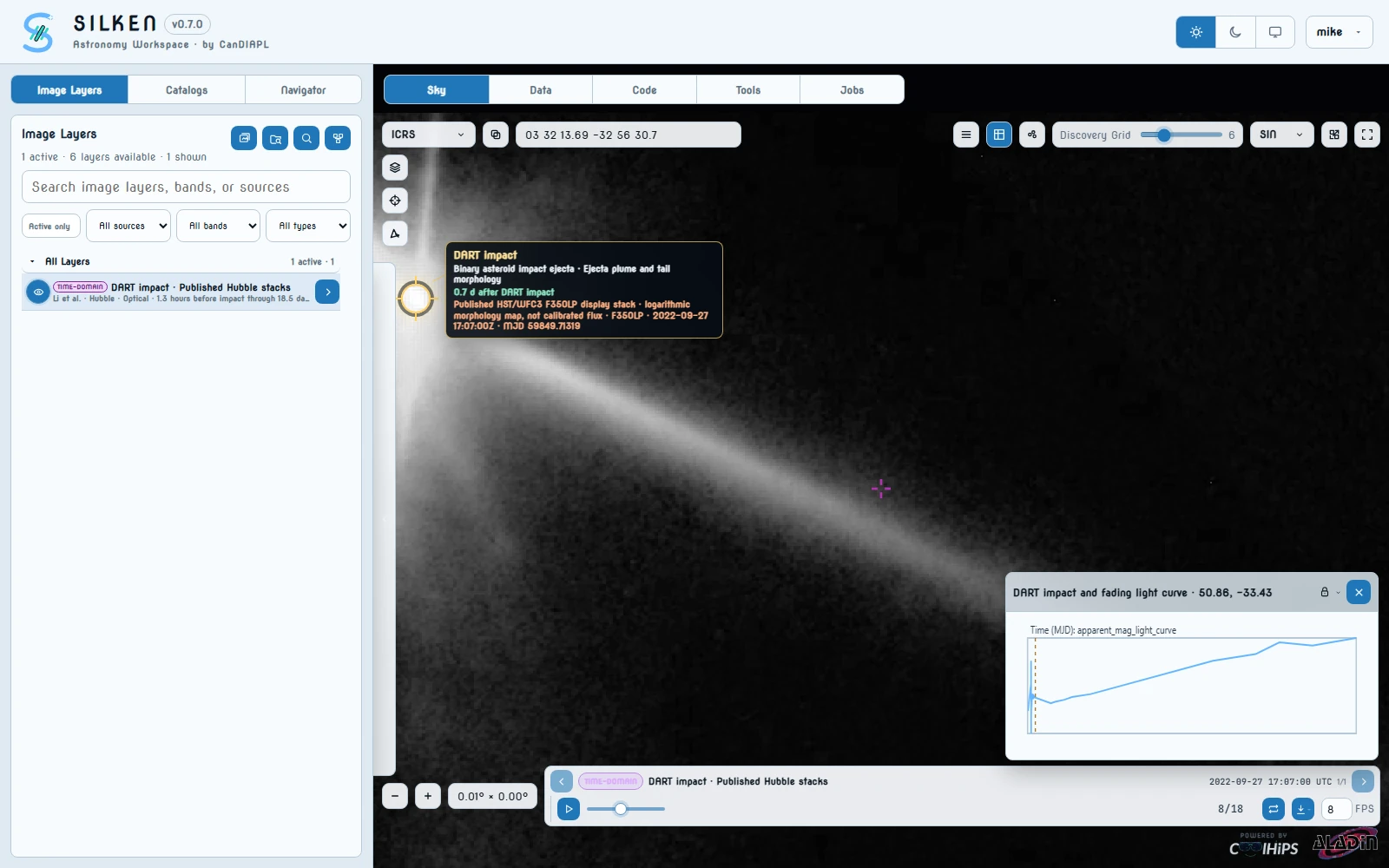
Start a new work session, open Image Layers, and search for DART impact · Published Hubble stacks. Activate the time-domain layer, enter 50.8624107 -33.4298825 in the sky position field, and use a field of view near 0.0065 deg. The layer contains eighteen north-up Hubble visit stacks from 1.3 hours before impact through 18.5 days afterward; this field retains the complete ejecta while the tracked raster centre keeps the empty image-footprint gutter outside the view.
Query the published photometry
Open Catalogs > VO Tables, choose DART impact photometry, keep the impact+fading filter and a 500-sample limit, then run the query. SILKEN retrieves the authors' Figure 2 and Figure 3 source tables, registers the result in Data, and records their upstream provenance. In the result's Overlay section, add apparent_mag_light_curve as an array profile; SILKEN pairs it with the queried mjd array.
Lock the synchronized measurement
Lock the profile to Didymos so it remains visible while the moving-target frames recenter. Use the export layout controls to place the profile at the bottom-right and the ISO date-time at the top-left, leaving the legend off. The amber vertical cursor and nearest-sample marker should advance to the selected observation.
Inspect, then export
Scrub the complete timeline and compare the compact pre-impact source with the bright post-impact ejecta, the rapidly extending tail, and its changing asymmetric structure. Open the frame export menu, include the date and locked profile, choose WebM, and export all eighteen reviewed frames.
The plume changes shape and extent across the Hubble sequence while the synchronized brightness curve fades after impact. This is useful for relating resolved morphology to integrated photometry, not just demonstrating animation.
Open the curated flare
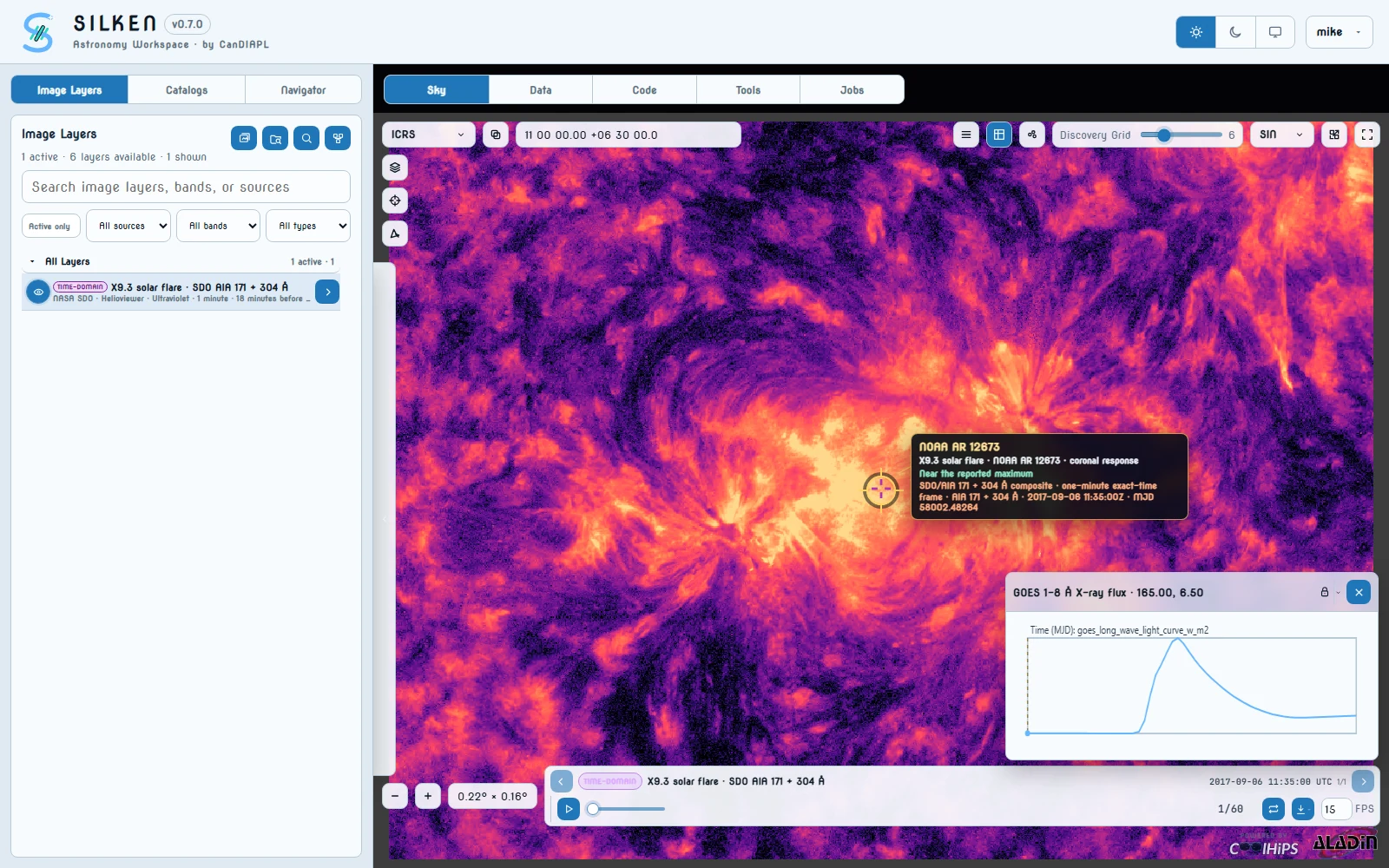
Start a new work session and search Image Layers for X9.3 solar flare · SDO AIA 171 + 304 Å. Activate the layer and select it in the bottom dataset strip. The sixty exact-time composites span 2017-09-06 11:35–12:34 UTC at one-minute cadence, covering pre-flare structure, onset, peak, and decay without duplicated frames.
Query the independent X-ray measurement
Under Catalogs > VO Tables, choose GOES solar X-ray flux. Query 2017-09-06T11:35:00Z/2017-09-06T12:35:00Z with a 500-sample limit. SILKEN requests the official NASA ISWA HAPI goesp_xray_flux_P1M feed and registers the returned measurements in Data. Add goes_long_wave_light_curve_w_m2 as an array profile; its queried mjd values align one-for-one with the image cadence. Lock the panel, then place it at bottom-right and put the ISO date-time at top-left in the export layout.
Relate morphology to flux
Step through the timeline and watch the compact active-region core brighten while surrounding ultraviolet loops evolve. Confirm that the vertical cursor crosses the rapid GOES 1–8 Å rise and peak at the corresponding frames, then follows the measured decay.
Export the complete event
Open the frame export menu, include the locked GOES profile and date, leave the legend off, select WebM, and export all sixty frames. SILKEN keeps a bounded decoded-image window in the browser while the contributed runtime stages the sequence, so increasing the frame count does not require retaining every decoded FITS image client-side.
Fine coronal loops and the compact flare core evolve visibly through onset, peak, and decay while the moving profile cursor follows the independent X-ray measurement.
Establish the multi-wavelength host context
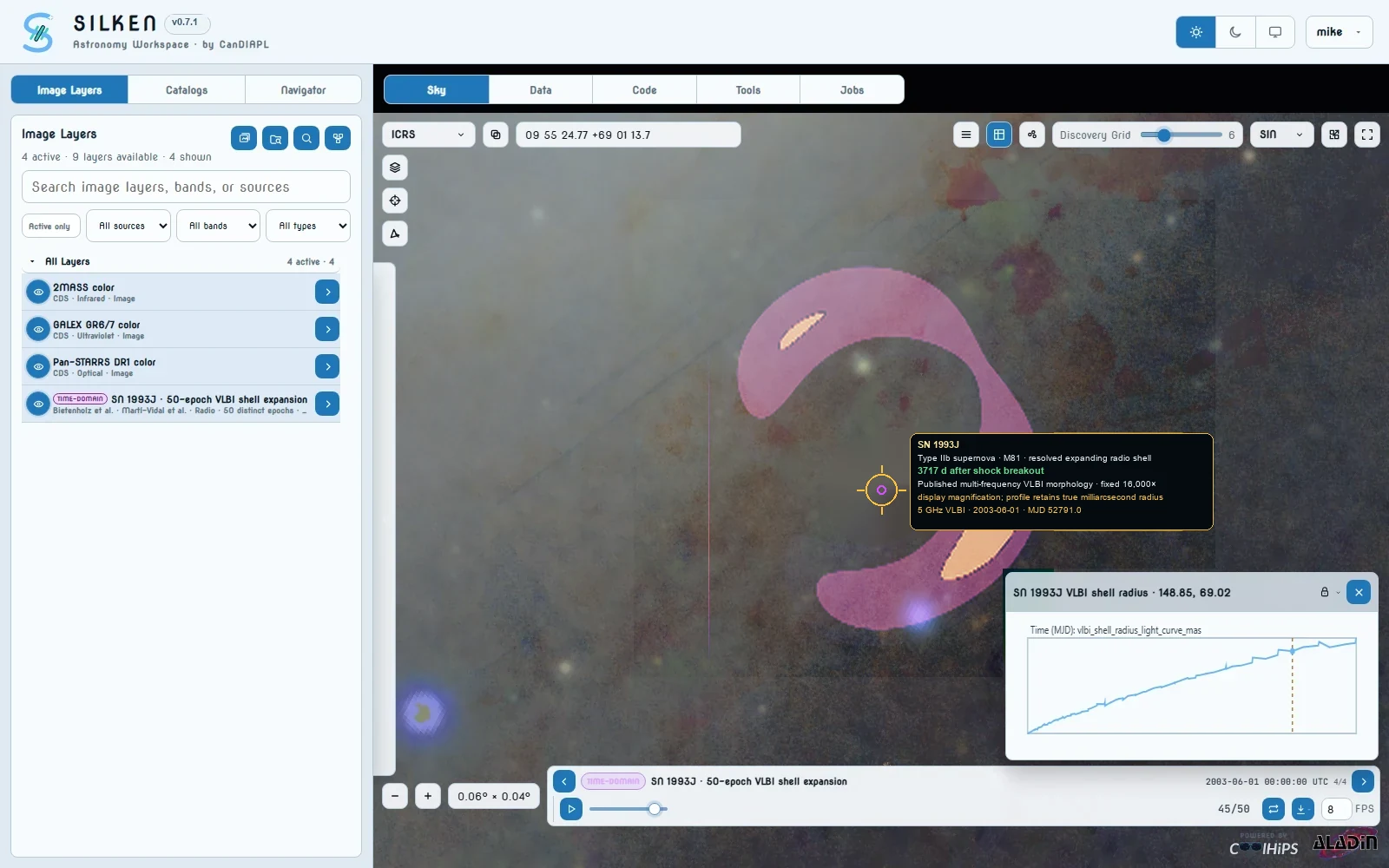
Enter 148.853225 +69.020472 and begin near a one-degree field. Replace the default sky with Pan-STARRS DR1 color, then add GALEX GR6/7 color and 2MASS color. Use roughly 45%, 25%, and 30% opacity respectively so M81's high-resolution optical field, ultraviolet star formation, and near-infrared structure remain distinguishable without washing out the radio morphology. This establishes where the supernova occurred before moving to the resolved expansion view.
Blend the resolved radio morphology over the host field
Search Image Layers for SN 1993J · 50-epoch VLBI shell expansion and activate it without disabling the three host-context layers. Select the sequence in the bottom dataset strip, set the radio layer to about 92% opacity with screen blending, and use a field near 0.0187 deg. SILKEN applies one fixed 16,000× display magnification to every VLBI map so the shell's changing morphology is legible while the optical, ultraviolet, and infrared context remains visible. This is an explicitly labelled visualization scale—not a claim that the milliarcsecond radio shell covers that sky area; only VLBI has milliarcsecond information at this zoom, and the queried radius profile plus each FITS RADIUS value retain the true angular measurement.
Query the published radius measurements
Open Catalogs > VO Tables, choose SN 1993J VLBI expansion, leave the filter at all, and run the query. SILKEN retrieves and parses Table 1 from the Marti-Vidal et al. arXiv source at query time. Add vlbi_shell_radius_light_curve_mas as an array profile; the accompanying mjd, observing frequency, and uncertainty arrays come from that published table rather than a SILKEN demo file.
Compare structure and measurements
Lock the profile at the supernova coordinate, place it at bottom-right for export, and put the observing date at top-left. Scrub all fifty frames and note the increasing radius and evolving azimuthal brightness across the 1.7, 5.0, and 8.4 GHz maps. The amber vertical cursor must move to the observation time represented by each frame.
Export the resolved expansion
Open the frame export menu, include the profile and observing date, leave the legend off, choose WebM, and export the complete fifty-epoch sequence. The exported frames preserve the published map normalization for morphological comparison while the profile retains the measured angular radii.
A blended optical, ultraviolet, and infrared field locates SN 1993J in M81 while a background-subtracted, consistently magnified radio morphology grows from a compact source into a widening asymmetric shell. Zero-valued display background is screened away so the host field remains visible around the emission rather than reading as a coloured square. The query-derived true radius curve and moving observation-time cursor keep the visualization tied to the measured milliarcsecond expansion.
Open the resolved Hubble archive sequence
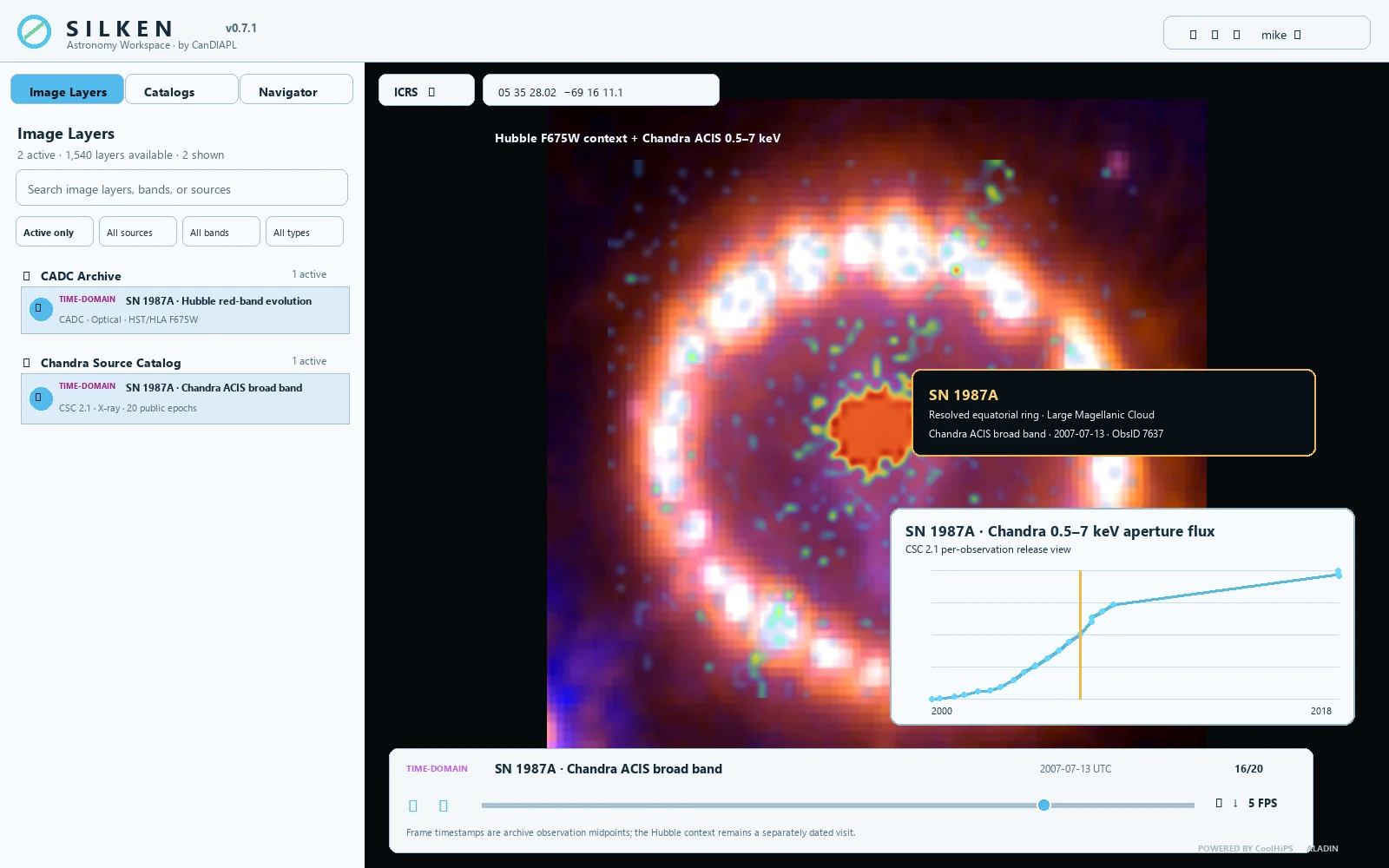
Enter 83.86675 -69.269742 and use a field near 0.0083 deg. In Image Layers, search for SN 1987A · Hubble red-band evolution and click its frames icon. SILKEN queries CADC at the CAOM Plane level for public HST and Hubble Legacy Archive F675W visits from 1994–2007, then resolves only the selected artifacts through DataLink/SODA. Import the available visits and scrub them to reproduce the twelve-year optical-ring evolution without a bundled demo file.
Add the public Chandra image sequence
Search for SN 1987A · Chandra ACIS broad band and open its frames dialog. The Chandra Source Catalog 2.1 SIAP release currently advertises 20 public broad-band ACIS observations from 2000-12-08 through 2009-01-05 at this position. Choose All and import them. In the validated live run, the archive staged 18 products successfully and rejected its two earliest advertised files; SILKEN reports and excludes unavailable products rather than substituting images. The full archive FITS products are fetched by the contributed CANFAR runtime, validated against an exact Chandra URL allow-list, and reduced there to bounded 30 arcsec TAN cutouts; raw archive URLs and credentials never enter the browser or workspace.
Query the measured X-ray curve
Open Catalogs > VO Tables, choose SN 1987A Chandra flux, leave the filter at broad, and run the query. SILKEN queries the current CSC 2.1 release-view TAP tables for source 2CXO J053528.0-691611. Add chandra_broad_band_flux_light_curve_erg_s_cm2 as an array profile. Its MJD, 68% flux limits, count rate, observation ID, detector, and live time are registered in Data directly from the archive response.
Compare morphology with the flux rise
Leave a representative Hubble F675W visit visible as the resolved optical context, select the Chandra sequence in the bottom dataset strip, and use a screen blend near 70% for the X-ray layer. Lock the Chandra profile at SN 1987A and place it at bottom-right; put the ISO observation date at top-left. As the 18 currently retrievable X-ray frames advance, the vertical cursor follows the corresponding per-observation flux measurement while the optical ring remains spatial context.
Export an evidence-preserving comparison
Open the frame export menu, include the profile and observation date, leave the legend off, choose WebM, and export the 18 successfully staged Chandra frames. Use the separate Hubble sequence to inspect optical evolution at its native visits rather than pretending the two observatories supplied simultaneous exposures.
The Hubble layer resolves the equatorial ring and hotspots, while the Chandra sequence shows the X-ray shock interaction brightening and changing across the same remnant. The moving profile cursor ties image morphology to measured 0.5–7 keV flux, and every image remains traceable to a public CADC or Chandra archive record.
Open the archive-backed Hubble sequence
Enter 148.9255 +69.673861 and use a field near 0.01 deg. In Image Layers, search for SN 2014J · Hubble light-echo evolution and click its frames icon. The preset queries CADC for HST F475W Plane records between MJD 56967 and 57872, then lazily resolves only the selected products.
Select the measured cadence
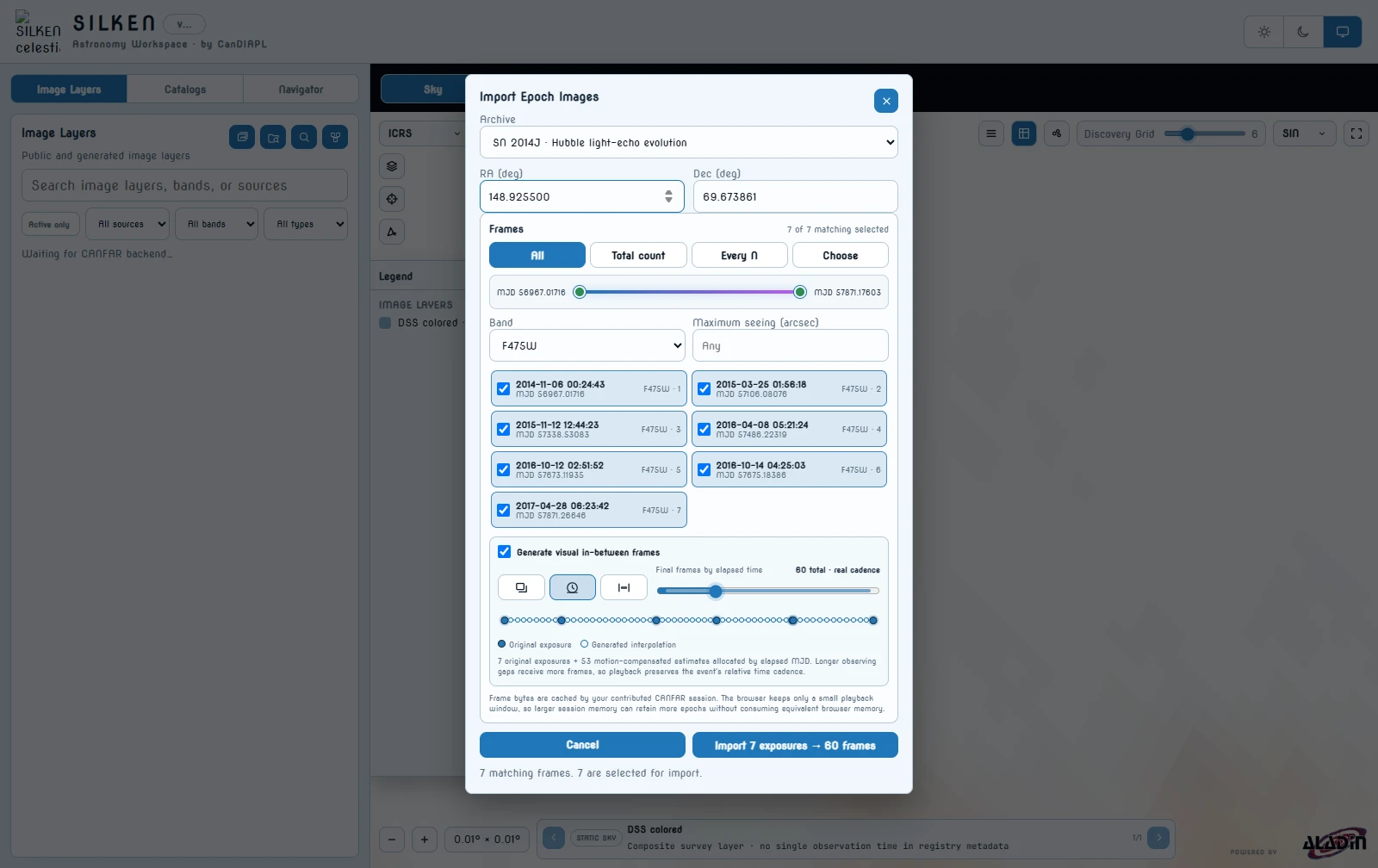
Choose All. The picker shows the seven public visits from 2014-11-06 through 2017-04-28. These solid timeline markers are the only original exposures; filtering or manually choosing frames updates the interpolation preview immediately.
Design a real-time-cadence visual timeline
Enable Generate visual in-between frames, choose Real cadence, and set the final timeline to 60 frames. SILKEN allocates the 53 generated frames in proportion to the actual MJD between adjacent observations: a gap twice as long receives roughly twice as many visual estimates. Playback is therefore a uniformly sped-up model of elapsed event time instead of advancing every observation pair at the same speed.
SILKEN estimates apparent motion from each exposure toward its neighbour and warps both parents toward every intermediate date before blending them. This bidirectional treatment reduces the doubled echo structures produced by a fixed-pixel cross-fade. Total frames spreads a chosen total evenly across observation pairs, while Between exposures requests an explicit fixed number after every measured visit. The modal's solid dots identify original exposures and its hollow dots identify generated estimates. The action reads Import 7 exposures → 60 frames.
Inspect dates and provenance
Import the sequence, then scrub the bottom timeline. Original frames display Original exposure. Generated frames use the compact label Interpolated · N% beside their estimated date, while the complete parent exposure IDs and allocation mode remain in frame provenance. No generated frame is registered as an archive exposure or catalog measurement.
Export the smoother review movie
Open the frame export menu, include the ISO observation date, leave the legend off, choose WebM, and export all 60 frames. The date card embeds the compact ORIGINAL EXPOSURE or INTERPOLATED · N% distinction without covering the image. A FITS export additionally records EXPOSURE/INTERP frame types, allocation mode, and temporal fraction in its header.
The bright supernova fades while dust-scattered structure changes around its M82 environment. Bidirectional motion-compensated warping reduces doubled structures and the ghosting produced by a simple cross-fade; crisp post-rendered timestamps and tooltips continue to separate measured Hubble exposures from the 53 generated estimates.
Open the measured green-light sequence
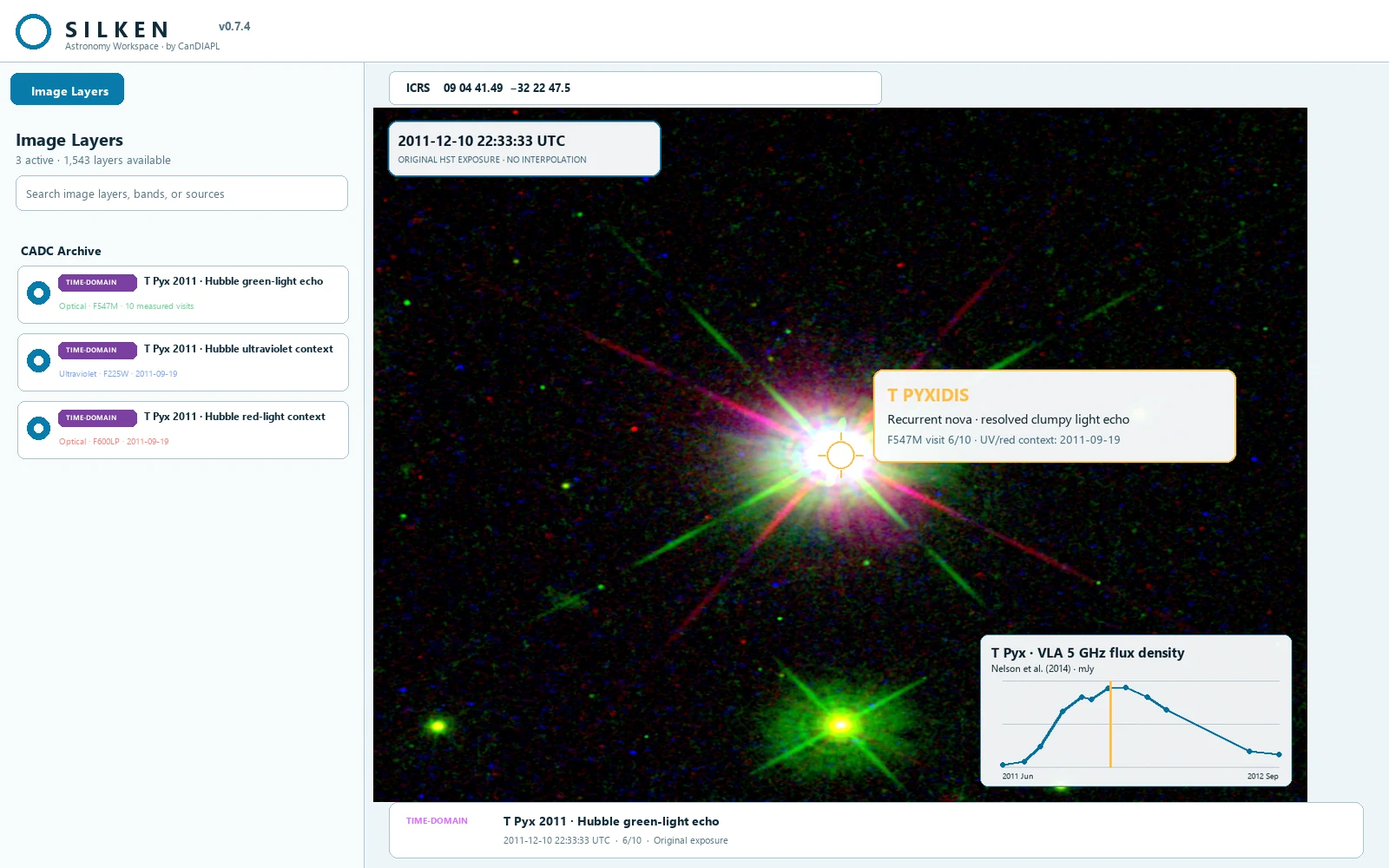
Enter 136.172875 -32.3798583 and use a field near 0.009 deg. In Image Layers, search for T Pyx 2011 · Hubble green-light echo and click its frames icon. Choose All to retain the ten curated F547M Plane products from Hubble proposal 12448, MJD 55750.9645 through 56138.0675. SILKEN resolves the public artifacts lazily through CADC DataLink and requests a 32 arcsec cutout.
Build colour from measured wavelengths
Activate T Pyx 2011 · Hubble ultraviolet context and select its 2011-09-19 F225W visit, then activate T Pyx 2011 · Hubble red-light context and select the F600LP visit from the same night. Keep those two measured visits fixed while the F547M sequence advances. In each expanded layer row, assign F225W blue, F547M green, and F600LP red; use screen blending at approximately 45%, 75%, and 55% opacity respectively. A saturation adjustment near +35% makes the wavelength contrast legible without pretending that one monochrome exposure contained colour.
The export states that the ultraviolet and red channels are fixed 2011-09-19 context. They are not silently re-dated to each F547M visit.
Query the eruption's radio measurement
Open Catalogs > VO Tables, choose T Pyx 2011 VLA light curve, keep the filter at 5 GHz, and run the query. SILKEN retrieves Nelson et al.'s machine-readable arXiv source and parses Table 1 at query time. Add vla_flux_density_light_curve_mjy as an array profile; the associated MJD, uncertainty, frequency, days since eruption, and observing date are registered in Data from the published table.
Follow the clumpy echo
Lock the VLA profile at T Pyx and place it at bottom-right. Put the ISO observation date at top-left and leave the legend off. Scrub the ten original F547M visits. The nova core fades while different knots in the roughly five-arcsecond ejecta structure brighten as the eruption's light reaches them; the vertical cursor simultaneously follows the delayed radio rise and decline.
Export the archive evidence
Open the frame export menu, include the locked profile and date, choose WebM, and export all ten frames. The result contains only the sky canvas, source callout, timestamp, and profile—never the surrounding browser interface. Each frame remains labelled Original HST exposure · no interpolation.
A high-resolution, colour-coded Hubble view shows the resolved T Pyx ejecta changing across ten real visits. The static ultraviolet/red context makes wavelength-dependent structure legible, while the independent 5 GHz curve shows the delayed thermal-radio evolution of the same nova event. The workflow is fully reproducible from CADC and the published source table.
Public services used
The demos combine public image and catalog services through SILKEN.
- IRSA ZTF program interface ↗
- ALeRCE ZTF database API ↗
- LSDB ALeRCE HATS tutorial ↗
- TNS SN 2020oi discovery certificate ↗
- SN 2020oi early-time optical and ultraviolet study ↗
- VizieR V838 Mon UBVR photometry ↗
- POSSUM pilot rotation-measure catalog ↗
- CADC POSSUM collection ↗
- CADC Advanced Search ↗
- NASA Hubble V838 Mon light echoes ↗
- NASA Hubble V838 Mon time sequence ↗
- MAST DART Hubble high-level science products ↗
- Published DART impact photometry tables ↗
- Helioviewer API ↗
- NASA ISWA HAPI GOES X-ray feed ↗
- NOAA GOES space-weather instruments ↗
- SN 1993J VLBI imaging, Paper III ↗
- SN 1993J VLBI data and shell evolution ↗
- NASA Hubble SN 1987A 1994–2006 sequence ↗
- Chandra Source Catalog VO services ↗
- Chandra SN 1987A multi-wavelength material ↗
- NASA Hubble SN 2014J light echo ↗
- SN 2014J light-echo measurements ↗
- NASA Hubble T Pyx ejecta map ↗
- Published T Pyx 2011 VLA light curve ↗
- GAVO TAP service ↗
- GWOSC GW151012 event data ↗